Introduction
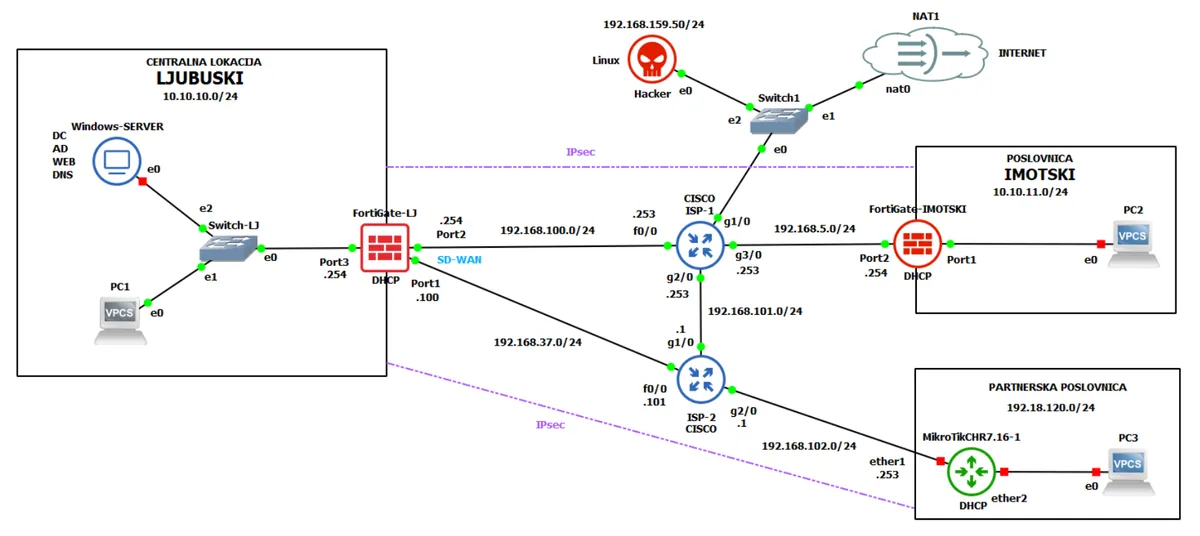
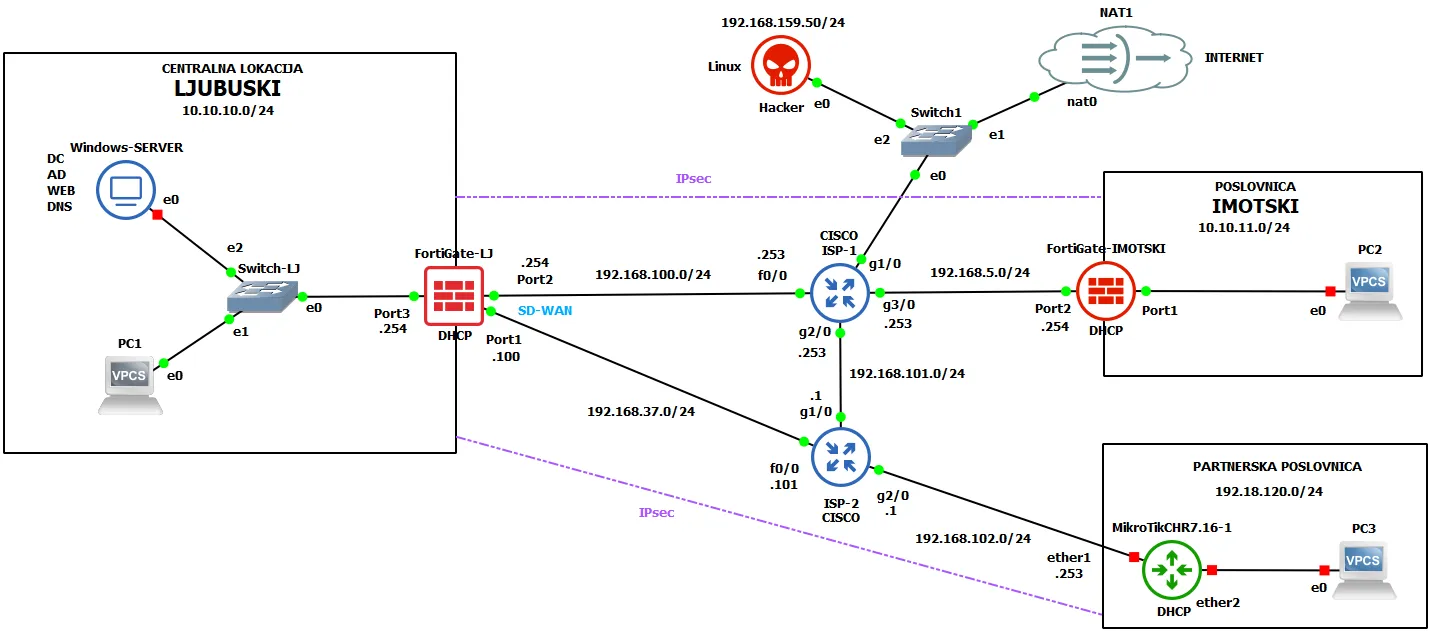
This project demonstrates the implementation of a complete NGFW security architecture for a fictional company called HercMerc, built as a multi-site GNS3 lab. The topology spans two main offices and a partner location, covering routing with redundancy, SD-WAN, IPsec Site-to-Site VPN, Fortinet Single Sign-On (FSSO) with Active Directory, and comprehensive UTM security profiles.
Note
The Hacker Linux VM was also used as a user PC in some steps due to limited host resources.
Traffic Routing with Failover
Routing in computer networks determines the optimal path for packets to travel from source to destination. Routers use routing tables containing destination networks, next hops, interfaces, and metrics. On FortiGate NGFWs, routing isn’t just a forwarding mechanism — it’s an integrated part of the security architecture that enables different security policies depending on traffic direction and origin.
Administrative Distance (AD) is a key concept when multiple routes to the same destination exist. AD is a value from 0–255 indicating the trustworthiness of a routing source — lower is more trusted. Directly connected routes have AD 0, static routes typically AD 10, OSPF uses AD 110, and RIP uses AD 120. When multiple routes exist, the router automatically picks the one with the lowest AD, enabling failover where backup routes activate only after a primary link failure.
Redundant Default Routes
On the FortiGate at the central Ljubuški location, two static default routes (0.0.0.0/0) were configured with different administrative distances:
- Primary route: gateway
192.168.100.253viaWAN-primarni(port2), AD 10 - Backup route: gateway
192.168.37.101viaWAN-backup(port1), AD 20
Testing Connectivity
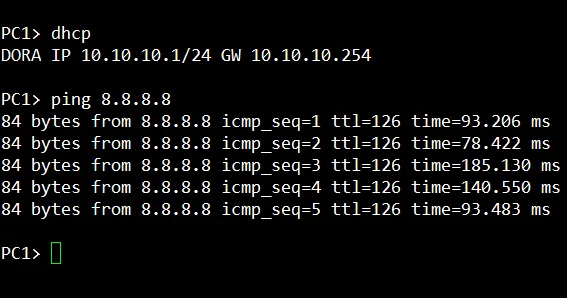
Basic routing was verified by pinging the public Google DNS address 8.8.8.8 from PC1 (which received its IP via DHCP from the FortiGate). Successful ICMP Echo Replies confirmed correct NAT configuration and security rules for outbound traffic.
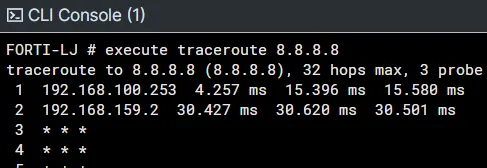
A traceroute showed that packets from PC1 first pass through FortiGate-LJ and then through ISP-1’s router at 192.168.100.253 via port2 — the primary route.
Failover Test
To test the failover mechanism, the primary link was simulated as down by disabling the port2 interface. FortiGate automatically detected the outage and activated the backup route via port1. A follow-up traceroute confirmed traffic was now routing through the alternative gateway 192.168.37.101.
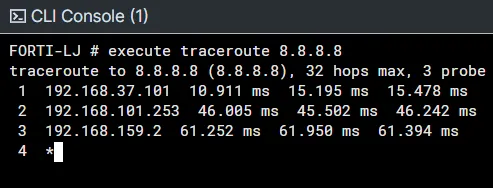
This redundant routing ensures high availability for internet access — critical for business continuity during primary link outages. The FortiGate at the Imotski location was configured similarly but without a backup link.
Security Policies and NAT
Security policies are the core component of any FortiGate firewall, defining how traffic between network segments is handled. They control access based on the organization’s security policy, specifying which traffic is allowed, blocked, or inspected by additional security profiles. NAT (Network Address Translation) transforms IP addresses in packets as they pass through the firewall.
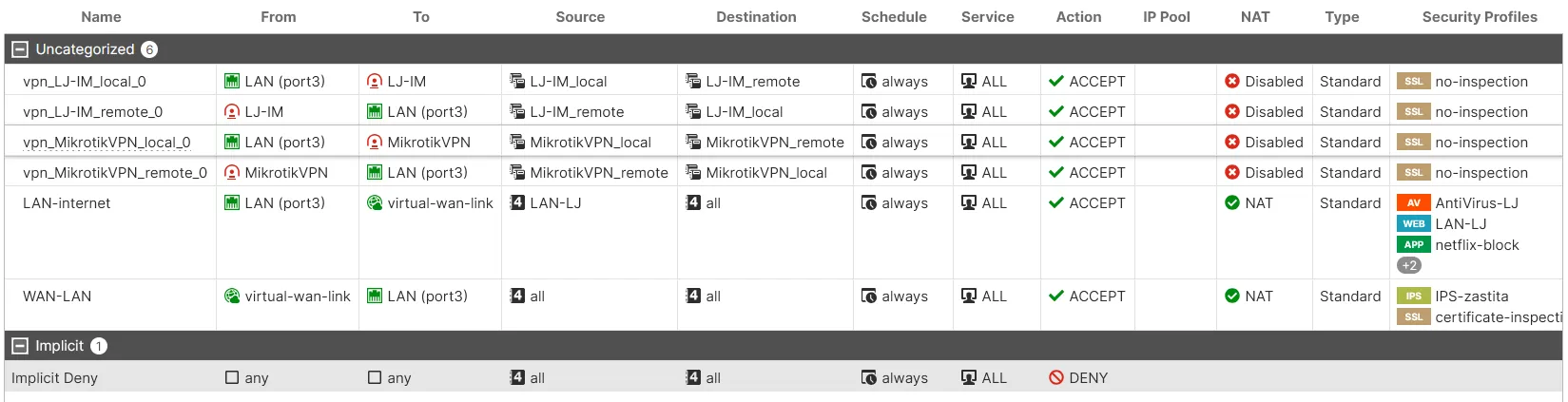
Six security policies were configured for this project:
| Policy | Direction | Purpose | Security Profiles |
|---|---|---|---|
| LAN-internet | LAN → WAN | Outbound internet from Ljubuški | AntiVirus, Web Filter, App Control, SSL Inspection |
| WAN-LAN | WAN → LAN | Inbound access to Ljubuški network | IPS protection |
| vpn_LJ-IM_local | LAN → VPN | VPN traffic to Imotski (local) | No inspection (already encrypted) |
| vpn_LJ-IM_remote | VPN → LAN | VPN traffic from Imotski (remote) | No inspection |
| vpn_MikrotikVPN_local | LAN → VPN | VPN traffic to MikroTik partner (local) | No inspection |
| vpn_MikrotikVPN_remote | VPN → LAN | VPN traffic from MikroTik partner (remote) | No inspection |
The key policy here is LAN-internet, which applies a full UTM inspection stack to all outbound traffic: antivirus scanning, web filtering (blocking social media), application control (blocking Netflix), and deep SSL/TLS inspection.
Fortinet Single Sign-On (FSSO)
Fortinet Single Sign-On (FSSO) provides transparent user identification on the firewall without requiring users to re-enter credentials when accessing network resources. It lets the FortiGate map IP addresses to authenticated Active Directory user accounts, enabling security policies based on individual users or AD groups instead of just IP addresses.
Architecture
The FSSO architecture consists of three key elements:
- FSSO Collector Agent — installed on the Windows Domain Controller, it monitors Windows Security Event logs, maps IP addresses to authenticated usernames, and sends user-IP mappings to the FortiGate
- FortiGate External Connector — a configuration on the FortiGate that establishes a connection with the FSSO agent and receives active user session data
- User Groups — groups on the FortiGate that reference AD groups/OUs and are used in security policies for role-based access
FSSO eliminates explicit firewall authentication — once a user logs into the Windows domain, all their traffic is automatically associated with their identity. Administrators can use AD groups for policy definitions instead of maintaining separate user databases on the firewall.
Implementation
FSSO was deployed to integrate the FortiGate at Ljubuški with a Windows Server Active Directory domain. The Fortinet SSO Agent was installed on the Domain Controller.
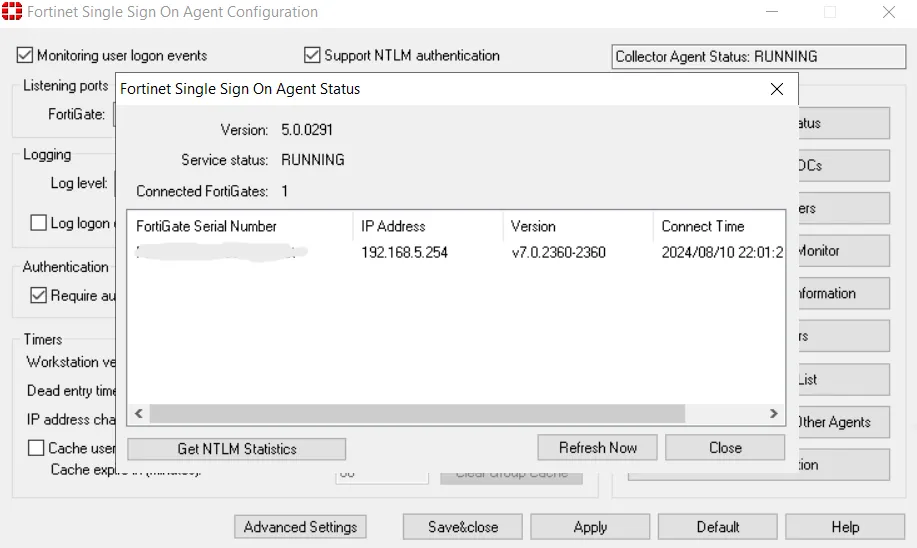
The FSSO Agent (version 5.0.0291) shows a service status of RUNNING, confirming the Collector Agent is active and connected.
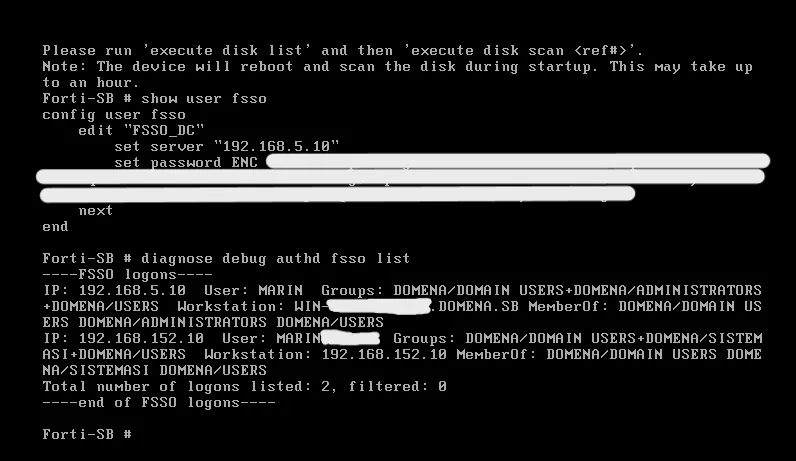
The FortiGate CLI output shows the config user fsso section where the “FSSO_DC” connector was created with the primary agent IP 192.168.5.10. The diagnose debug authd fsso list command displays currently active user sessions tracked through FSSO.
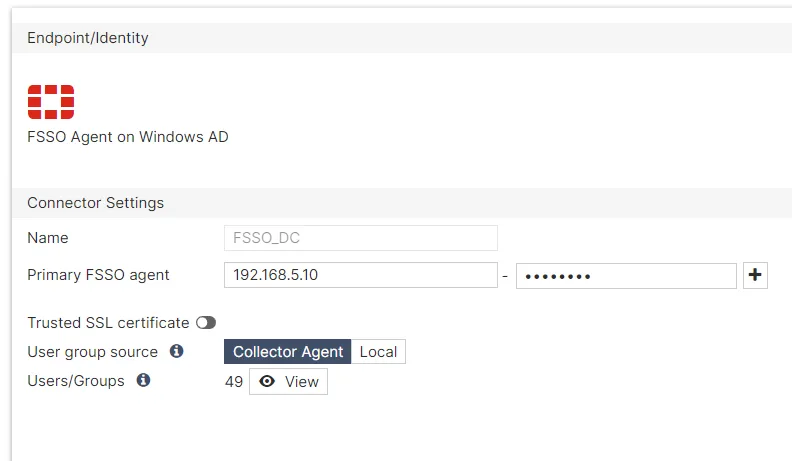
The External Connector (under Security Fabric > External Connectors) was configured as type “FSSO Agent on Windows AD” with the Collector Agent as the user group source.
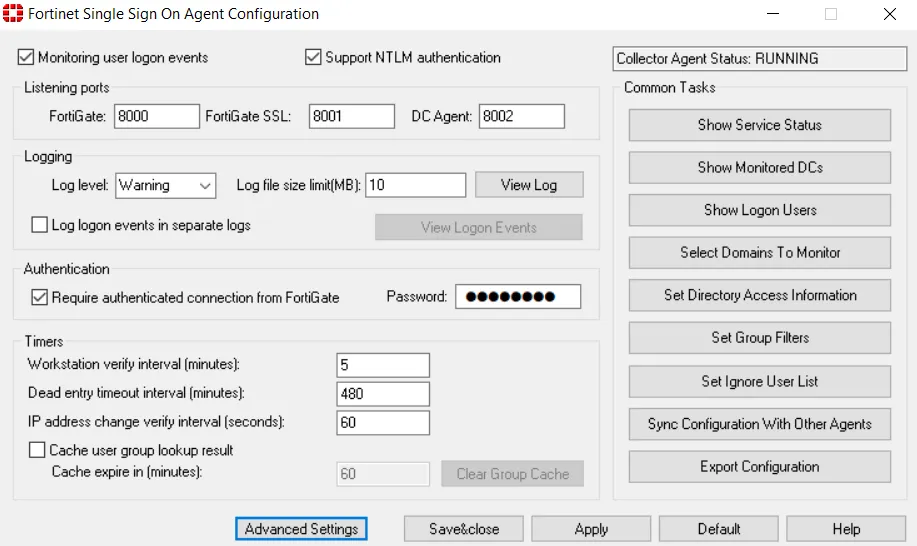
With FSSO in place, the FortiGate applies security rules based on AD groups — users automatically inherit access rights through their group memberships without any additional per-user firewall configuration.
SD-WAN
SD-WAN (Software-Defined Wide Area Network) enables intelligent traffic routing based on real-time link performance and defined priorities. Unlike static routing with fixed metrics like administrative distance, SD-WAN makes dynamic decisions based on latency, jitter, packet loss, and link availability.
Configuration
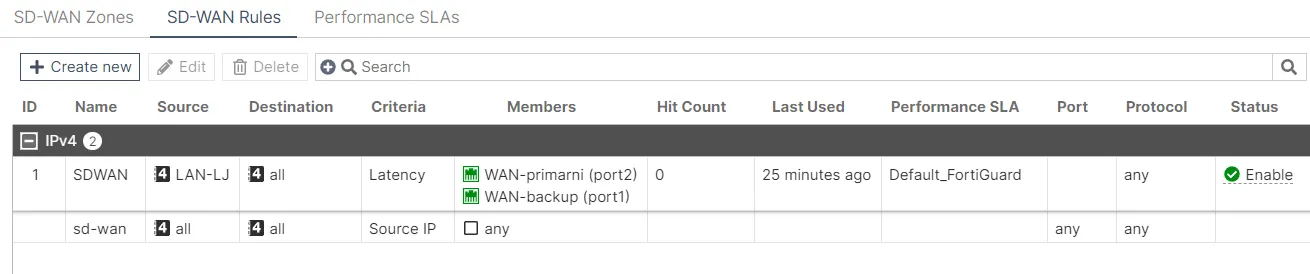
An SD-WAN zone named “SDWAN” was created on FortiGate-LJ, combining the two outbound links: WAN-primarni (port2) and WAN-backup (port1). A rule was defined with the source set to the LAN-LJ zone, destination to all addresses, and latency as the link selection criteria. This ensures FortiGate always uses the link with lower latency.
Link quality was measured using the built-in FortiGuard service as a performance monitoring target (Default_FortiGuard) and an additional custom test against Google DNS (8.8.8.8).
Verification
Traffic distribution between links was analyzed over a time period. The bandwidth charts clearly show dynamic utilization of both links depending on their current performance.
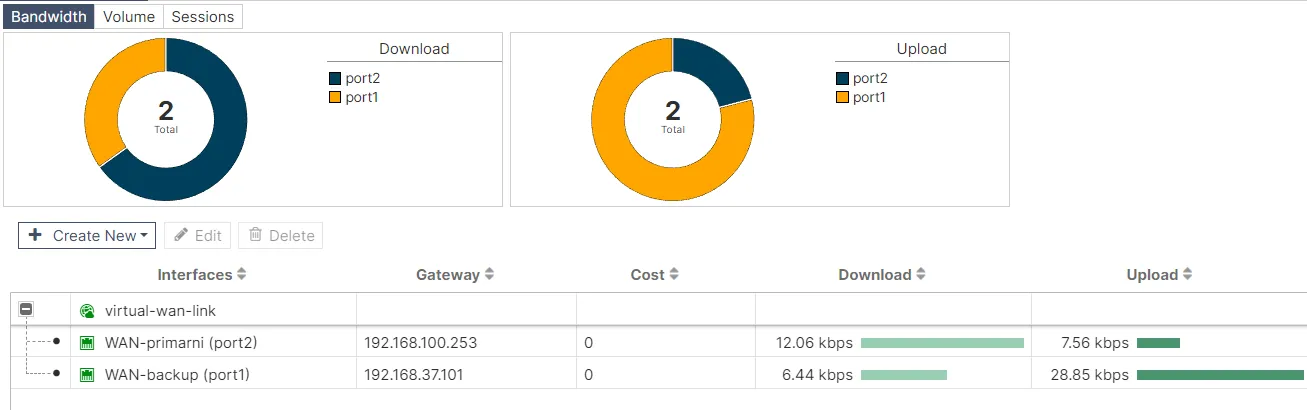
The detailed performance view of the Default_FortiGuard target shows latency, jitter, and availability metrics for both links. FortiGate uses these measurements to make real-time routing decisions.
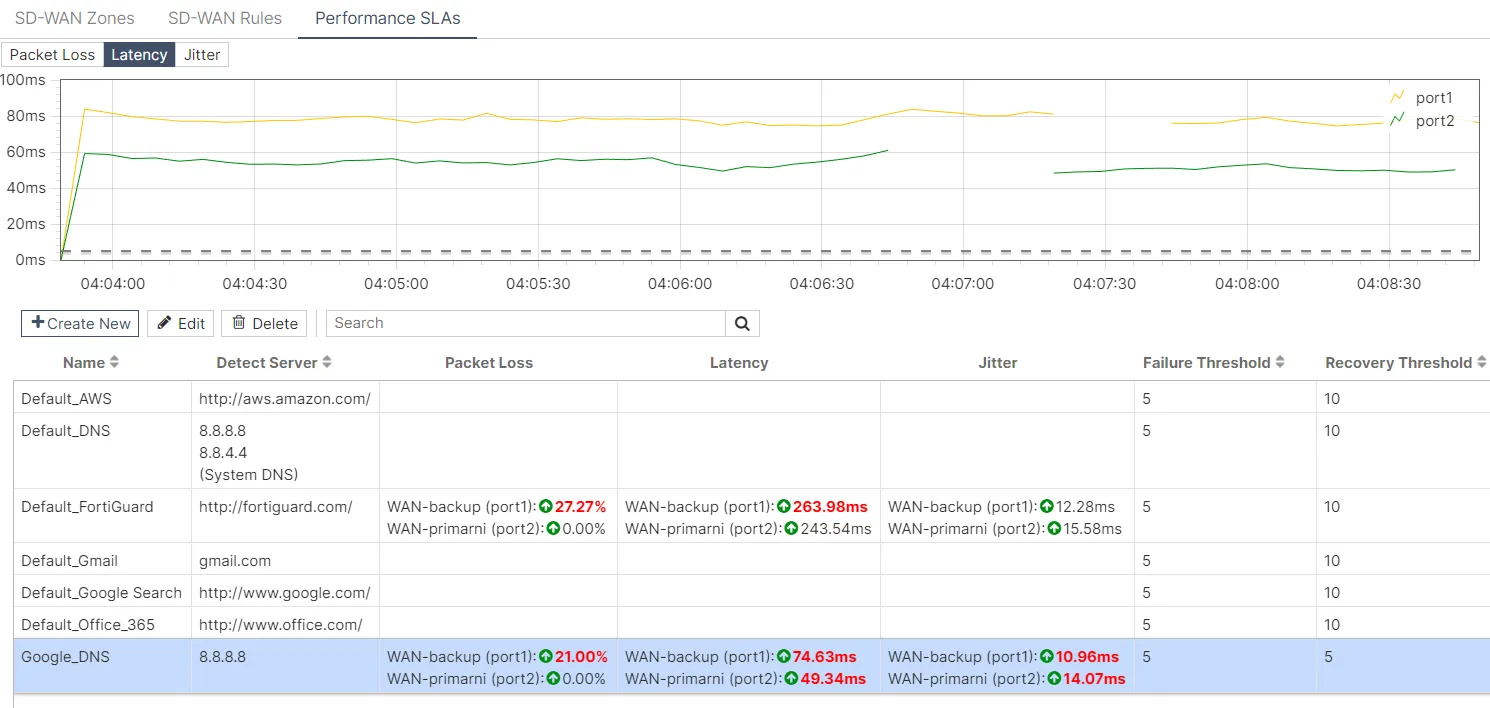
The SD-WAN implementation ensures intelligent outbound traffic management, automatic redistribution during link degradation, and seamless failover.
Site-to-Site VPN
Site-to-Site VPN enables secure communication between geographically separated locations over the public internet. An IPsec tunnel was implemented between the partner location (MikroTik router with LAN 192.168.120.0/24) and the central Ljubuški location (FortiGate-LJ with LAN 20.20.20.0/24).
IPsec Negotiation
IPsec provides confidentiality (encryption), integrity (hashing), and authentication. Tunnel establishment happens in two phases:
- IKE Phase 1 establishes the secure control channel — IKEv2 protocol, AES-256 encryption, SHA-256 hash, DH Group 14 (modp2048), with Pre-Shared Key authentication
- IKE Phase 2 establishes the IPsec Security Associations for user traffic — ESP with AES-256-CBC, SHA-256-HMAC, and PFS with DH Group 14
MikroTik Configuration
The MikroTik side required an IPsec Proposal with AES-256-CBC encryption and SHA-256 authentication, an IPsec Peer pointing to FortiGate at 192.168.100.254 using IKEv2, and — critically — NAT bypass rules at the top of the firewall NAT chain to exempt IPsec traffic from NAT processing, preserving original source IPs before encryption.
Verification
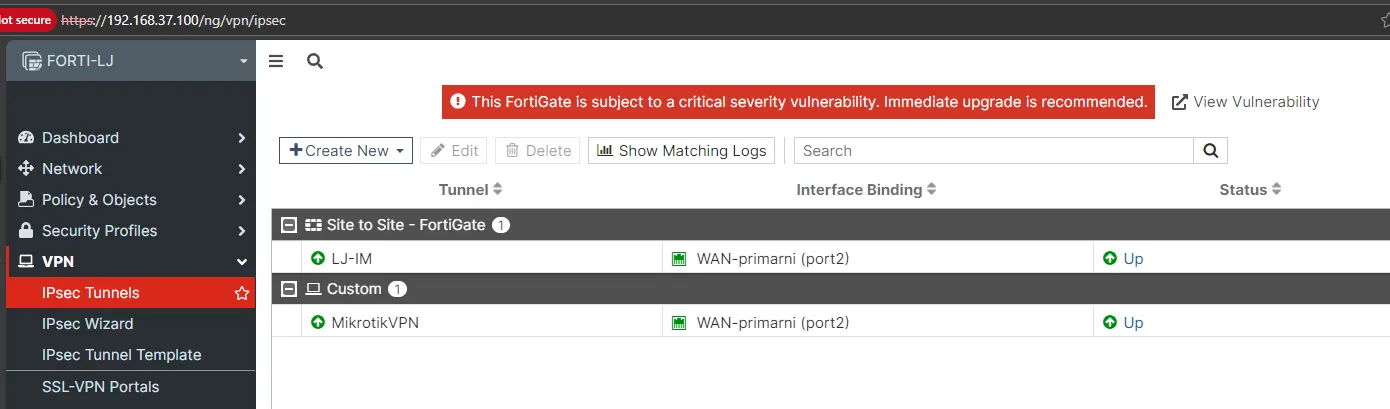
The FortiGate dashboard shows the “MikrotikVPN” tunnel in UP status.
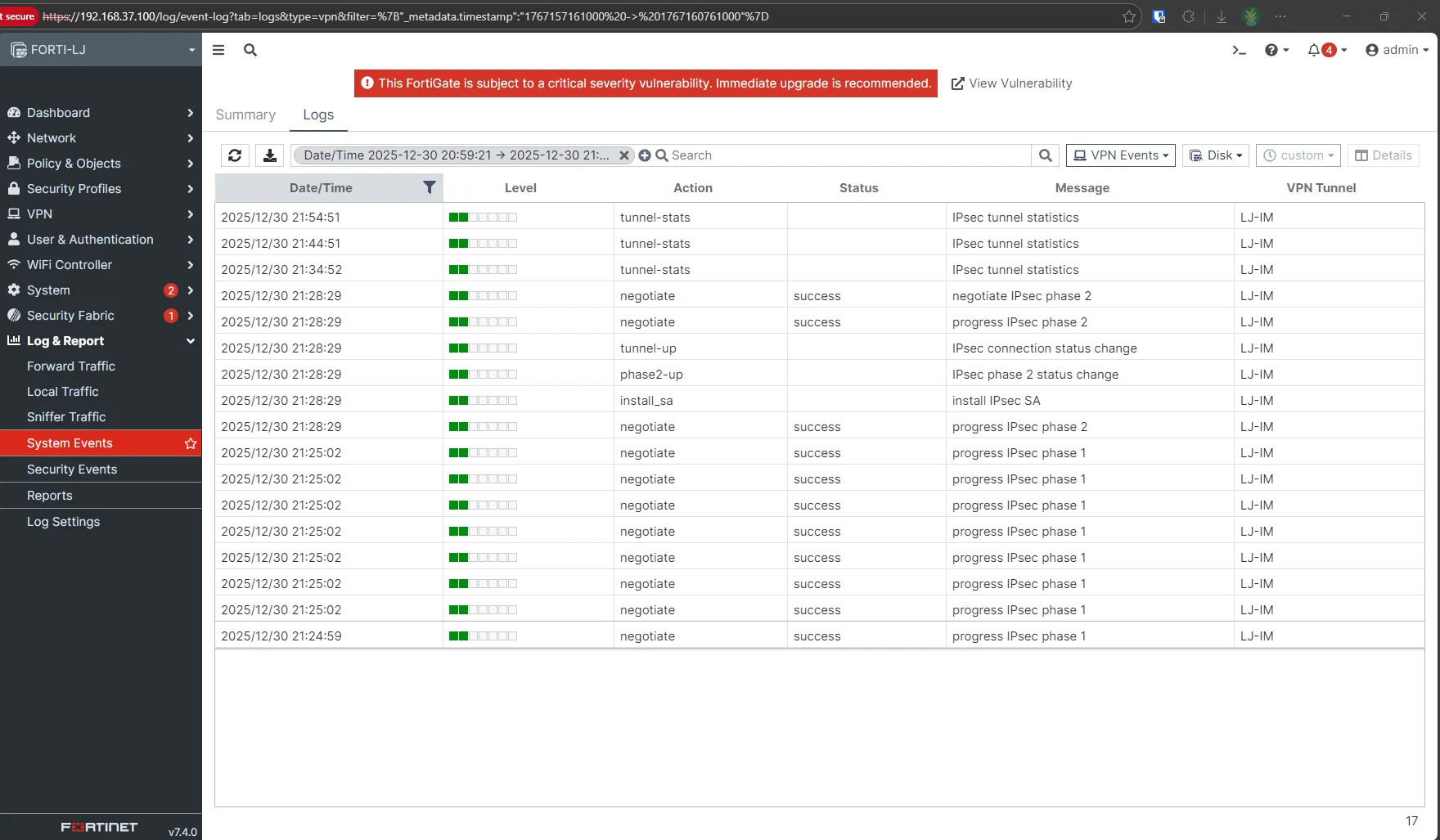
System event logs confirm successful IKE Phase 1 and Phase 2 establishment with “tunnel-up” and “phase2-up” messages.
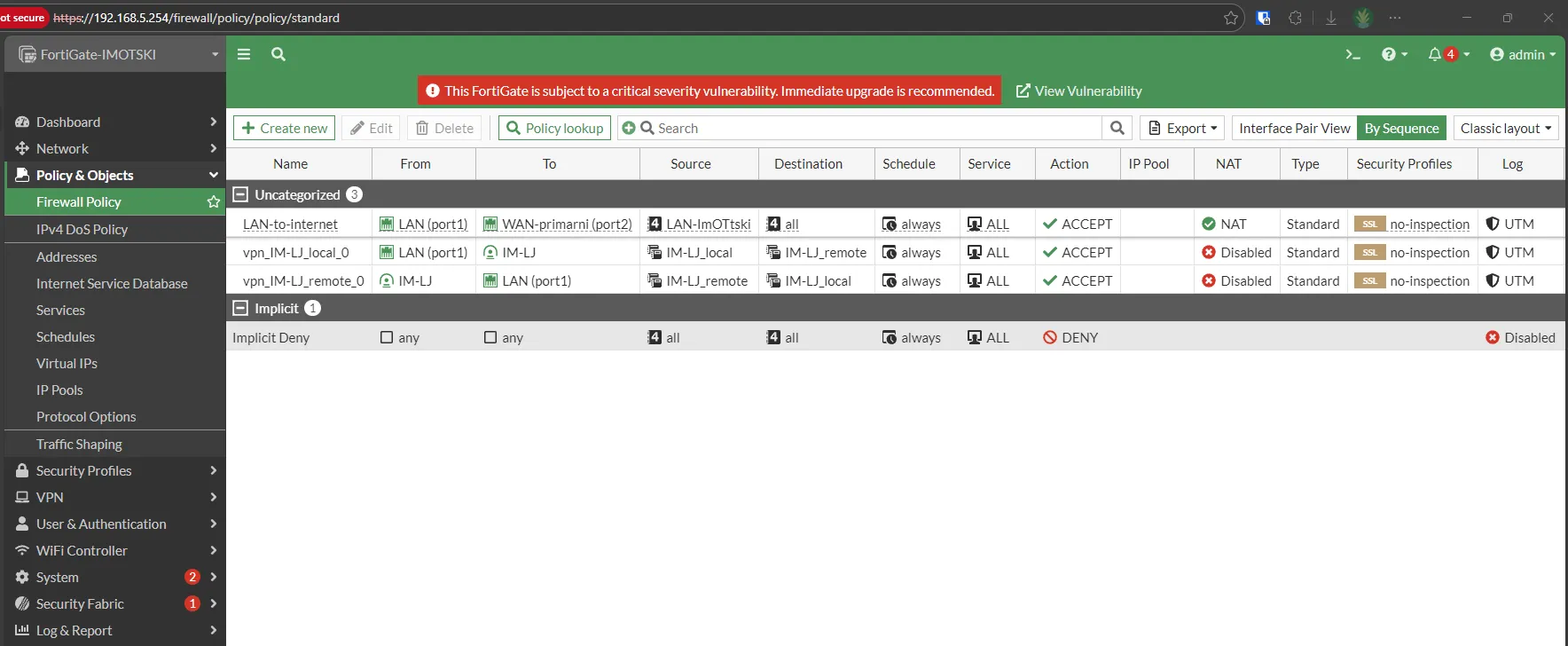
Firewall policies were automatically created between LAN and the IPsec interface (LJ-IM), allowing traffic between the local and remote subnets through the tunnel.
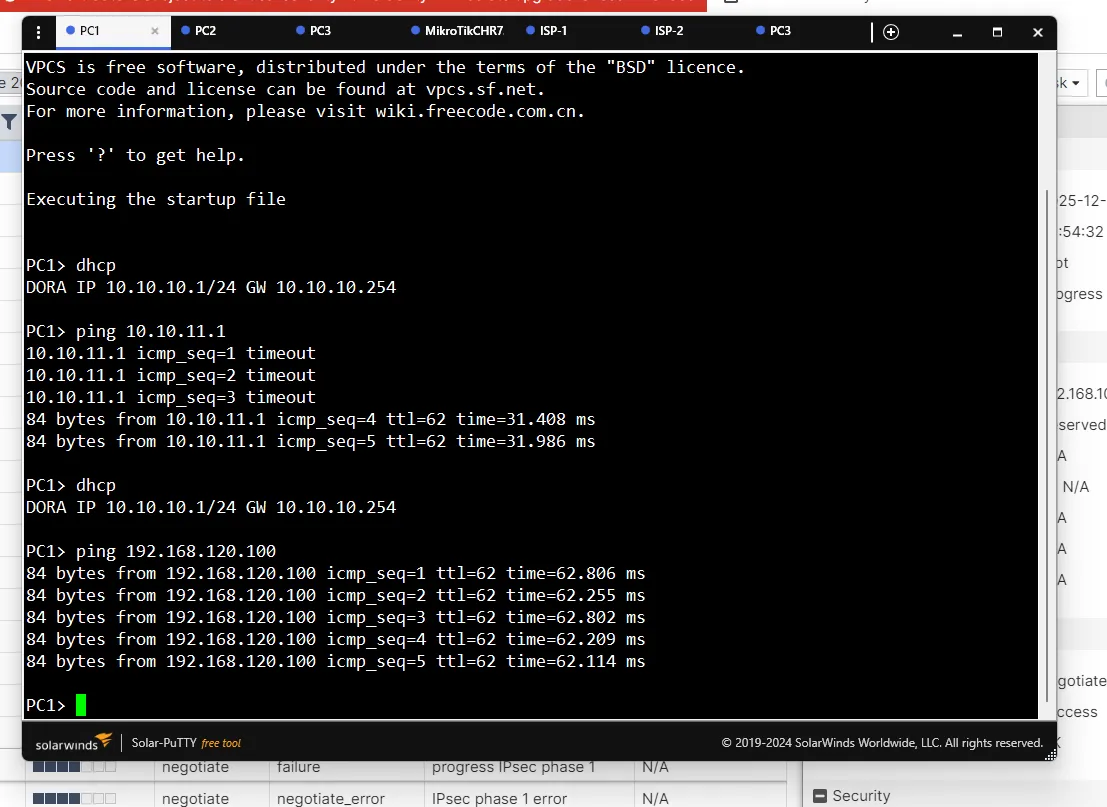
An end-to-end connectivity test from PC1 (10.10.10.1) to PC3 (192.168.120.100) confirmed the tunnel was fully functional, with ~62ms latency.
Note
The IPsec implementation required additional NAT and routing adjustments for bidirectional communication. NAT bypass rules on the MikroTik were essential to prevent source IP rewriting for tunnel-bound traffic. This highlights how NAT rule ordering, IPsec policies, and routing tables must be carefully coordinated in multi-vendor VPN deployments.
SSL/TLS Inspection
SSL/TLS inspection is a critical NGFW capability that enables deep analysis of encrypted traffic. With over 90% of internet traffic using HTTPS, firewalls that can’t inspect encrypted content are effectively blind.
How It Works
SSL/TLS inspection operates as a controlled Man-in-the-Middle (MITM), with FortiGate acting as an intermediary. Two modes are supported:
- Certificate Inspection — analyzes headers and the SSL certificate without decrypting content (checks validity, issuer, expiration)
- Deep Inspection — full decryption and analysis. FortiGate establishes an SSL session with the external server, receives and verifies the original certificate, dynamically generates a replacement certificate signed by its own CA, and presents it to the client. This allows full inspection through all security profiles before re-encrypting.
Configuration
A Full Deep Inspection SSL profile was configured using the Fortinet_CA_SSL certificate for signing dynamically generated certificates. The profile was applied to the outbound traffic rule for the 10.10.10.0/24 subnet.
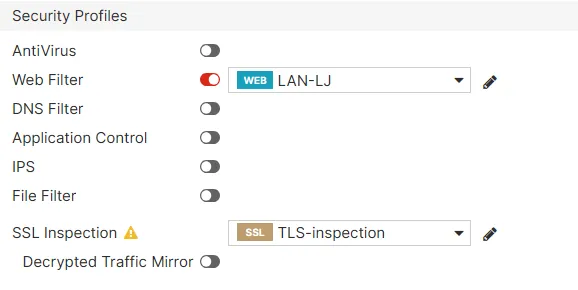
After configuration, the Fortinet_CA_SSL root certificate was exported and installed in Firefox on the client machine to trust the FortiGate’s replacement certificates without security warnings.
Verification
FortiGate logs show the “Resign as trusted” action for SSL connections, confirming that certificates are being intercepted and replaced.

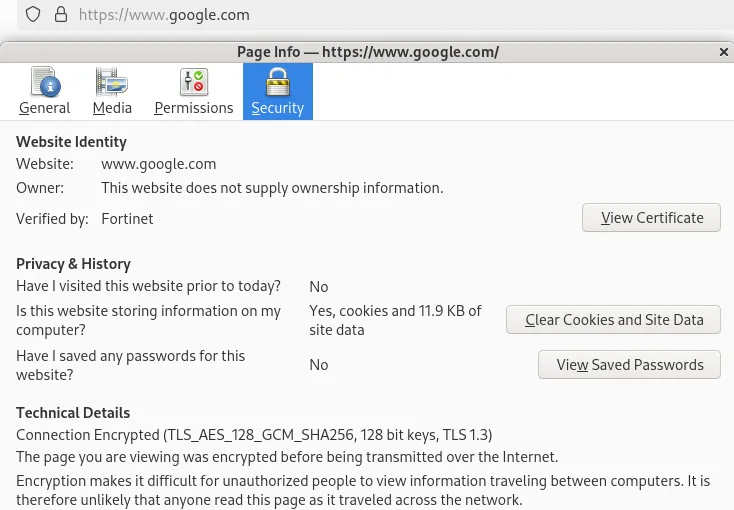
When browsing to google.com, Firefox’s Security tab shows the certificate was verified by Fortinet instead of the standard Google Trust Services CA — proof that the FortiGate is intercepting, decrypting, inspecting, and re-encrypting all HTTPS traffic.
Web Filtering
Web filtering controls access to internet content based on defined policies. Organizations use it to reduce exposure to threats (malware distribution, phishing, malicious sites) and to improve productivity by restricting access to inappropriate content during work hours.
FortiGate supports two primary mechanisms:
- FortiGuard category filtering — cloud-based database with 1B+ categorized URLs across 85+ categories. FortiGate intercepts the request, queries FortiGuard servers for the category, and applies the configured action (allow, block, monitor, warning)
- Static URL filtering — manually defined URL patterns with regex support, independent of FortiGuard categorization
Configuration and Testing
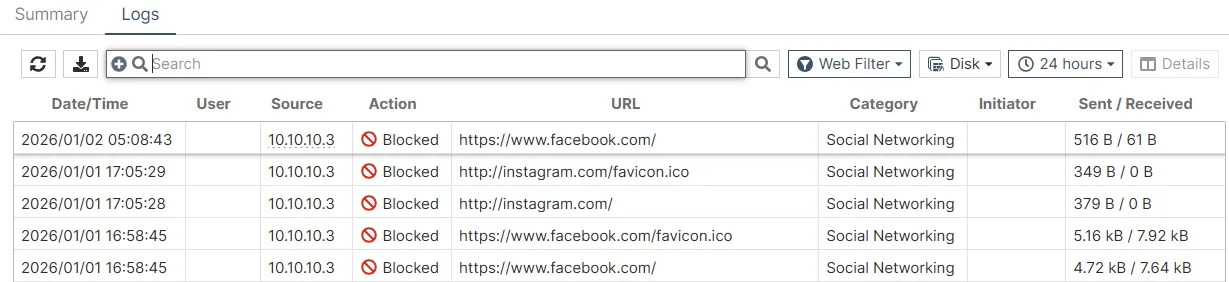
A web filter profile was created to block the Social Networking category (FortiGuard category #37) for all users in the 10.10.10.0/24 subnet.
FortiGate logs show continuous blocking of Instagram and Facebook access attempts from the LAN.
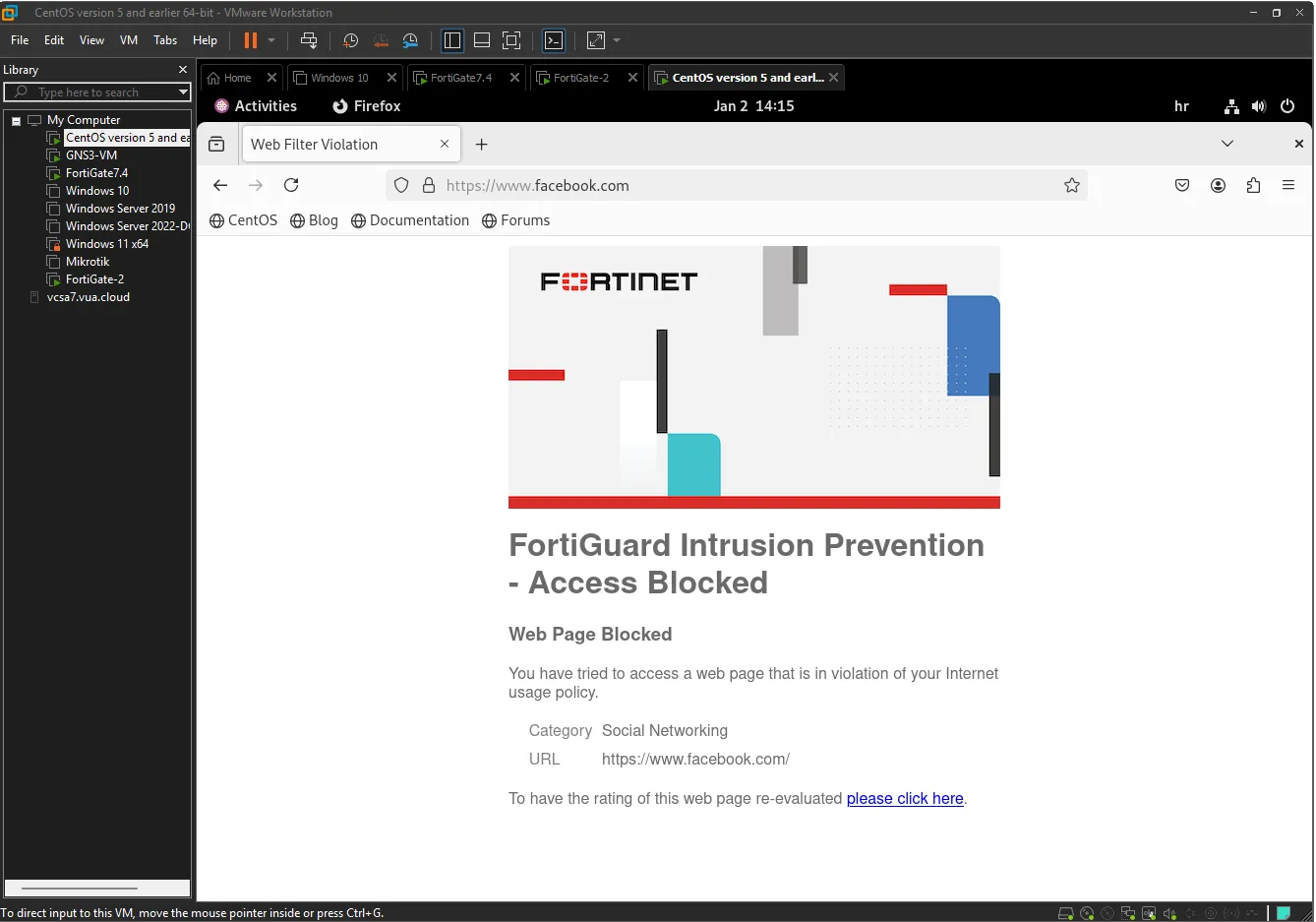
When a user attempts to visit facebook.com, they see a FortiGuard replacement page with the message “Web Page Blocked” and the reason “Social Networking” category.
Application Control
Application Control identifies, monitors, and regulates traffic at the application layer (Layer 7) regardless of ports or protocols used. Unlike traditional firewalls that only inspect IP addresses and TCP/UDP ports, Application Control uses Deep Packet Inspection (DPI) to analyze packet payloads and recognize applications by their digital signatures.
Web Filtering vs Application Control
The key difference: web filtering works only on HTTP/HTTPS and categorizes URLs, while Application Control works across all protocols and identifies specific applications even if they tunnel through standard ports. For example, web filtering can block youtube.com but can’t stop YouTube video streaming through a mobile app using tunneling techniques. Application Control recognizes the actual YouTube traffic based on application signatures regardless of transport method.
Configuration and Testing
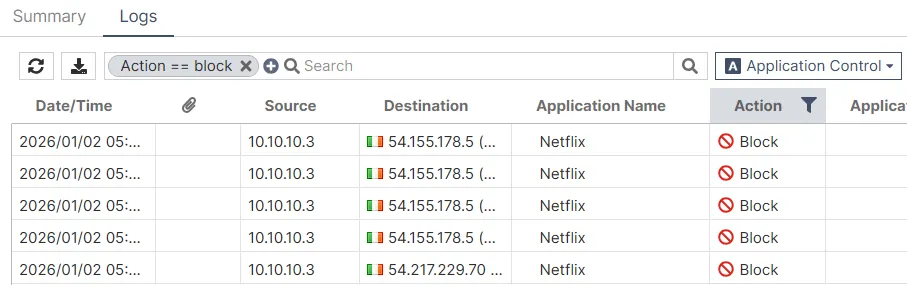
An Application Control profile was configured to block Netflix streaming. An override rule with priority 1 and action Block was created for all Netflix application signatures (Video/Audio category).
FortiGate logs show continuous blocking of Netflix connection attempts to various Netflix servers.
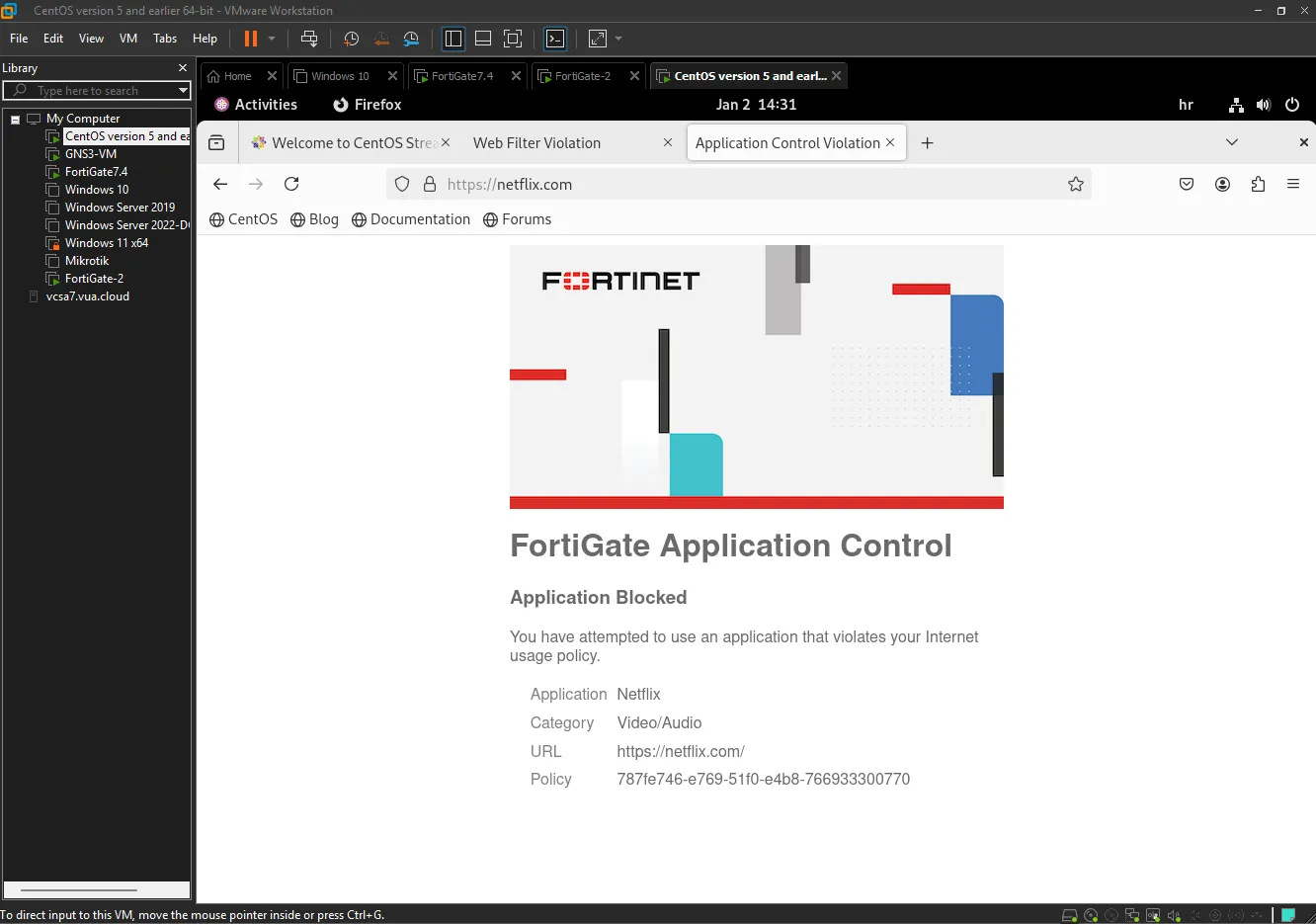
Users attempting to access netflix.com see a FortiGate replacement message confirming the block.
Antivirus
Antivirus traffic inspection enables real-time detection and blocking of malicious software as it passes through the network infrastructure. The firewall uses inline scanning to analyze file contents against the FortiGuard Antivirus signature database and takes action when threats are detected.
Limitations
- Cannot inspect encrypted traffic without SSL/TLS inspection enabled first
- Signature-dependent — cannot detect zero-day threats until signatures are added
- Adds CPU overhead and latency, especially with large file volumes
- Sophisticated malware may use obfuscation, polymorphism, or encapsulation to evade signature-based detection
Configuration and Testing
An antivirus profile named “AntiVirus-LJ” was configured for HTTP and HTTPS traffic inspection with mobile malware protection enabled.
Testing was performed using the EICAR standard test file — a harmless file that all antivirus engines recognize as malware purely for testing purposes. Download attempts from secure.eicar.org over HTTPS were made.
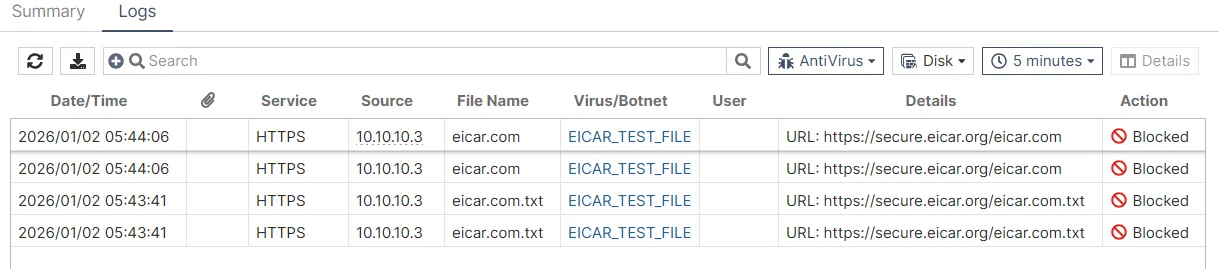
The logs show detected files (eicar.com and eicar.com.txt) with the Virus/Botnet field clearly identifying them as “EICAR_TEST_FILE” — all with action Blocked.
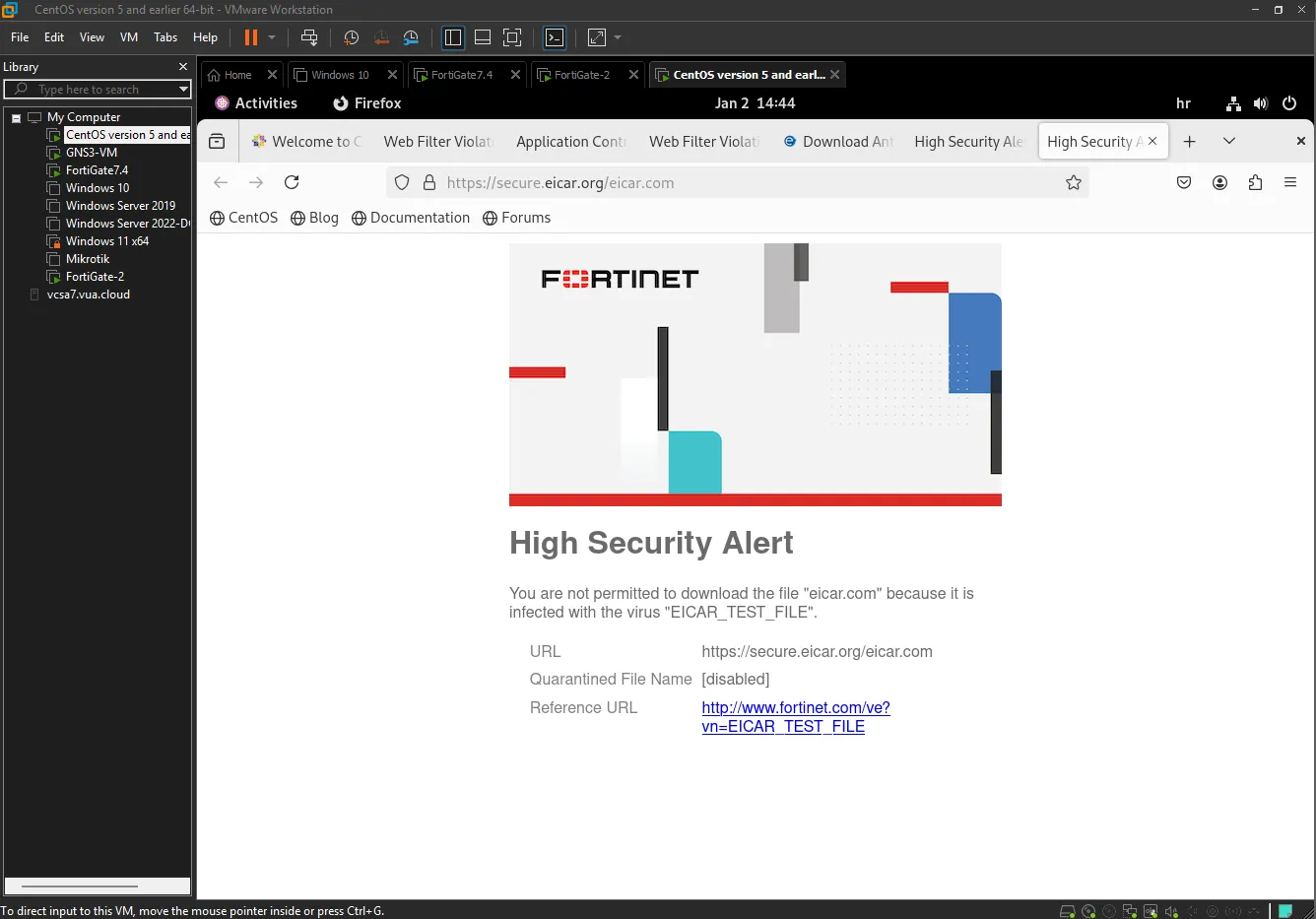
Users see a “High Security Alert” replacement page with the message: “You are not permitted to download the file ‘eicar.com’ because it is infected with the virus ‘EICAR_TEST_FILE’”.
Intrusion Prevention System (IPS)
The IPS actively protects the network from known and unknown threats in real time. Unlike passive Intrusion Detection Systems (IDS), IPS analyzes every packet passing through the firewall and can block malicious traffic before it reaches internal systems.
Modern IPS solutions combine signature-based detection, behavioral heuristic analysis, and zero-day detection algorithms. Anomalies — deviations from normal traffic behavior — may indicate an attack, such as TCP SYN flooding, excessive ICMP traffic, unusual fragmented packets, or abnormal traffic volumes from a single source.
SQL Injection Test
An exploit attack was launched from a Linux machine (192.168.159.128) targeting the internal Windows Server (20.20.20.1) via HTTP. FortiGate successfully detected an HTTP.URI.SQL.Injection attack and dropped the malicious traffic.
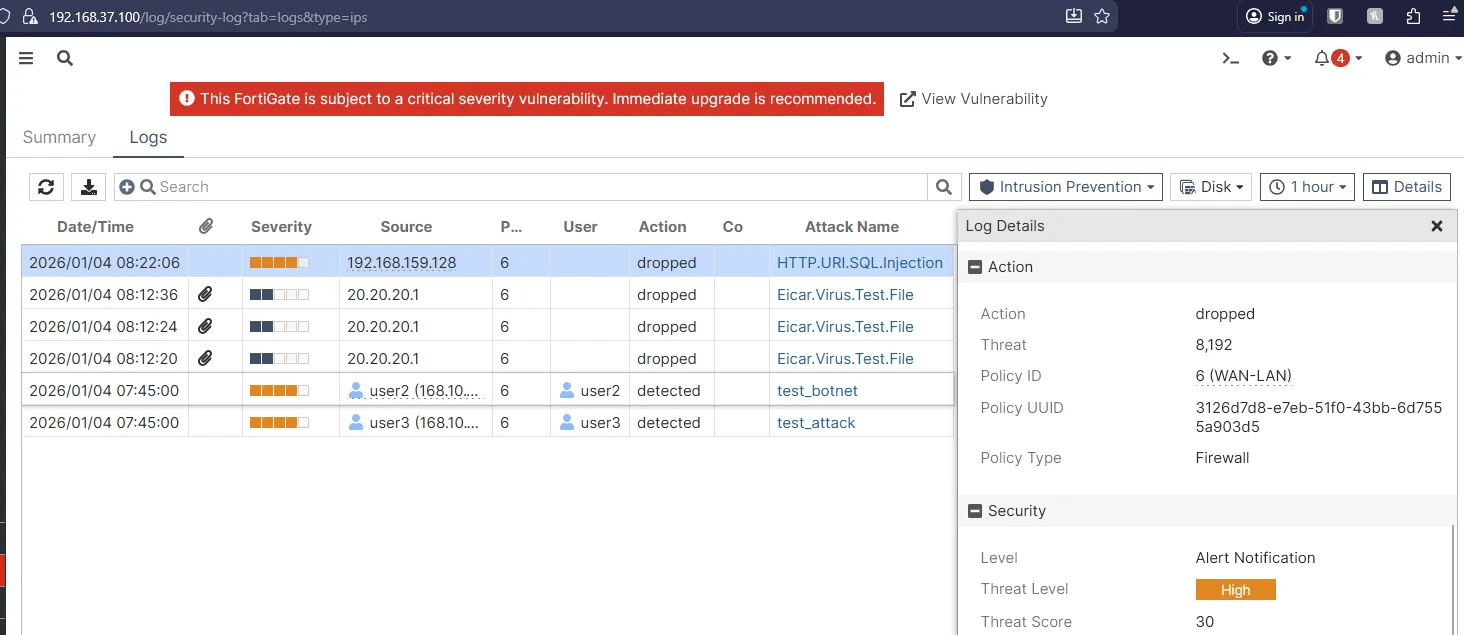
The log entry shows the attack classified as Threat Level: High, matched by Policy ID 6 (WAN-LAN), confirming protection was triggered on inbound traffic from the public network.
TCP SYN Flood Test
A TCP SYN flood DoS attack was also simulated. FortiGate detected the anomaly through the tcp_syn_flood signature and applied a clear_session action to terminate all malicious sessions.
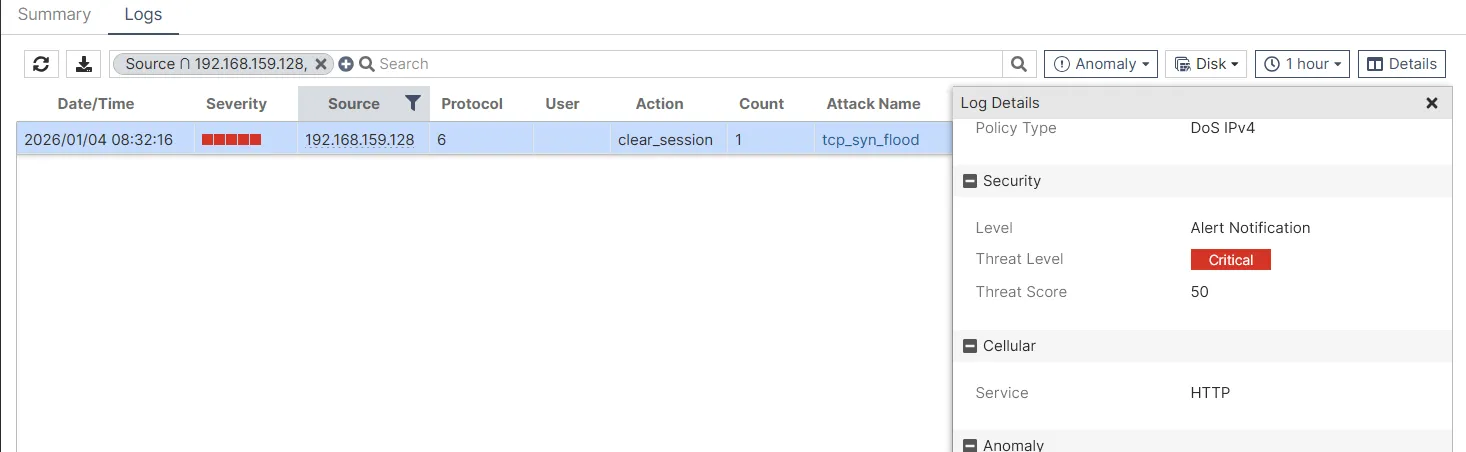
The threat was classified as Critical (threat score: 50) — the highest danger level requiring immediate action. The attack originated from 192.168.159.128 using HTTP as the attack vector.
Conclusion
This project demonstrates a fully functional NGFW security architecture for a multi-site enterprise, built on FortiGate firewalls and supporting network infrastructure. Through a topology spanning two main offices and a partner location, the following was achieved:
- High availability via redundant routing and SD-WAN with automatic failover
- Secure inter-site communication through IPsec Site-to-Site VPN tunnels (FortiGate-to-FortiGate and FortiGate-to-MikroTik)
- Identity-based policies using FSSO integration with Active Directory
- Deep traffic inspection with SSL/TLS deep inspection eliminating the encrypted traffic blind spot
- Comprehensive threat protection combining web filtering, application control, antivirus, and IPS — all verified through practical testing with real attack scenarios
The IPS component successfully detected and blocked SQL injection exploits, TCP SYN flood attacks, and EICAR test file transfers, demonstrating how signature detection, anomaly analysis, and integrated antivirus work together to protect the internal network.
The multi-vendor VPN implementation (FortiGate ↔ MikroTik) also highlighted the practical importance of coordinating NAT rules, IPsec policies, and routing tables across different platforms — a common real-world challenge.